

f (or click f ≡ Feed in the footer) to show the Feed with the keys, f again
while it has them to hide it, and Esc to give the keys back to the list. Drag the line on its left
to resize it.
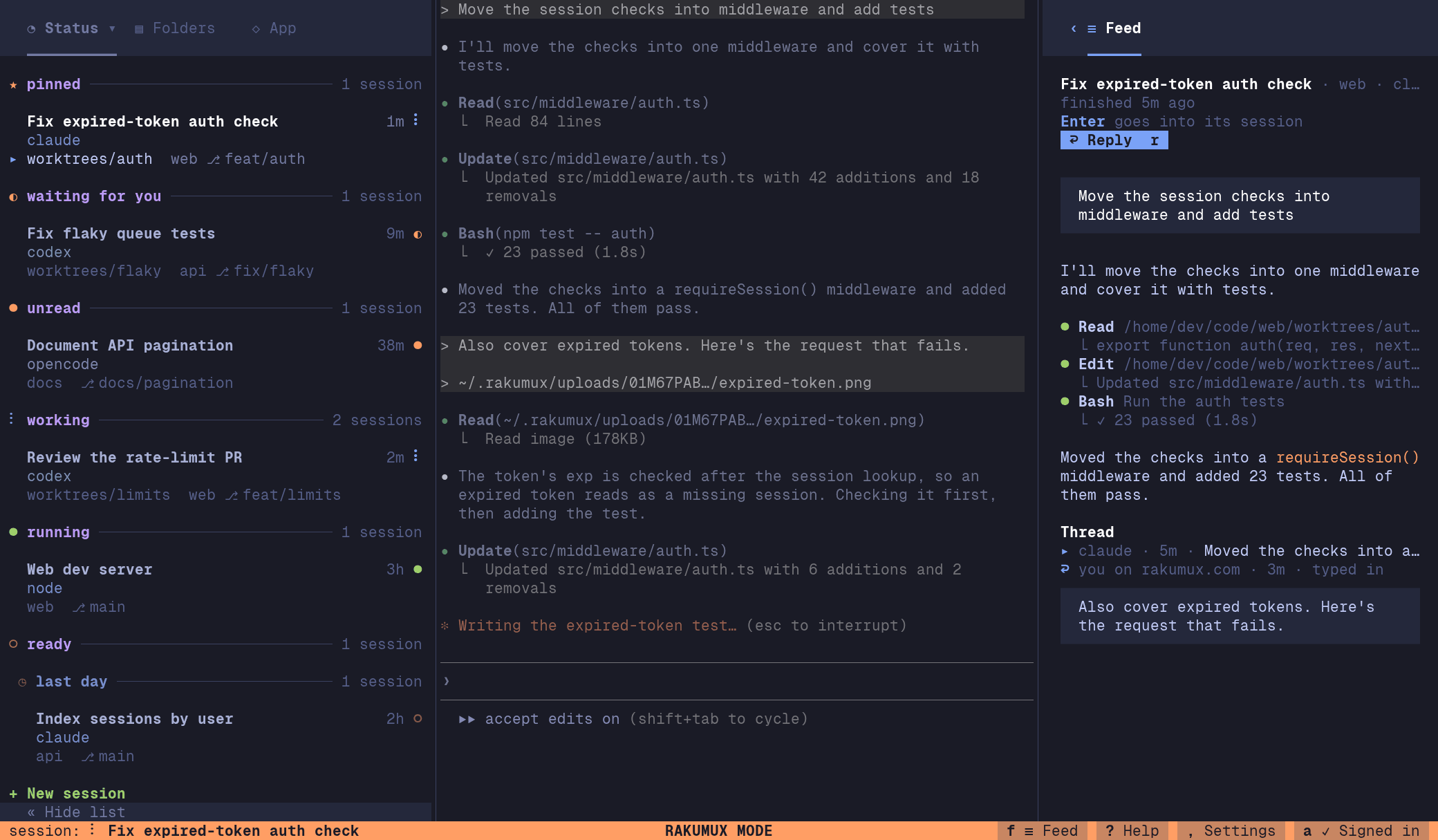
↑/↓ (j/k) go through the cards. Each card names its session, agent and
branch, with its age and status on the right, then your prompt and the start of the answer; a
prompt still waiting for its answer is a working card. Enter reads a turn whole in the cards’
place, with its thread when someone wrote back, and Enter again goes into its session when it runs
on this machine. r writes back to a session’s newest card (below).
The pane needs room beside the session: in a narrower window it takes the session’s place in
Rakumux mode only, so a session you’re typing in keeps its full width, and b (hiding the list)
makes room for it. Grid shows it beside the cards, Tabs gives it a Feed tab at the start of the
tab bar, and on a phone it fills the screen. While it’s hidden, f ≡ Feed counts the turns that
arrived since you last had it open (●3).
Read it on rakumux.com
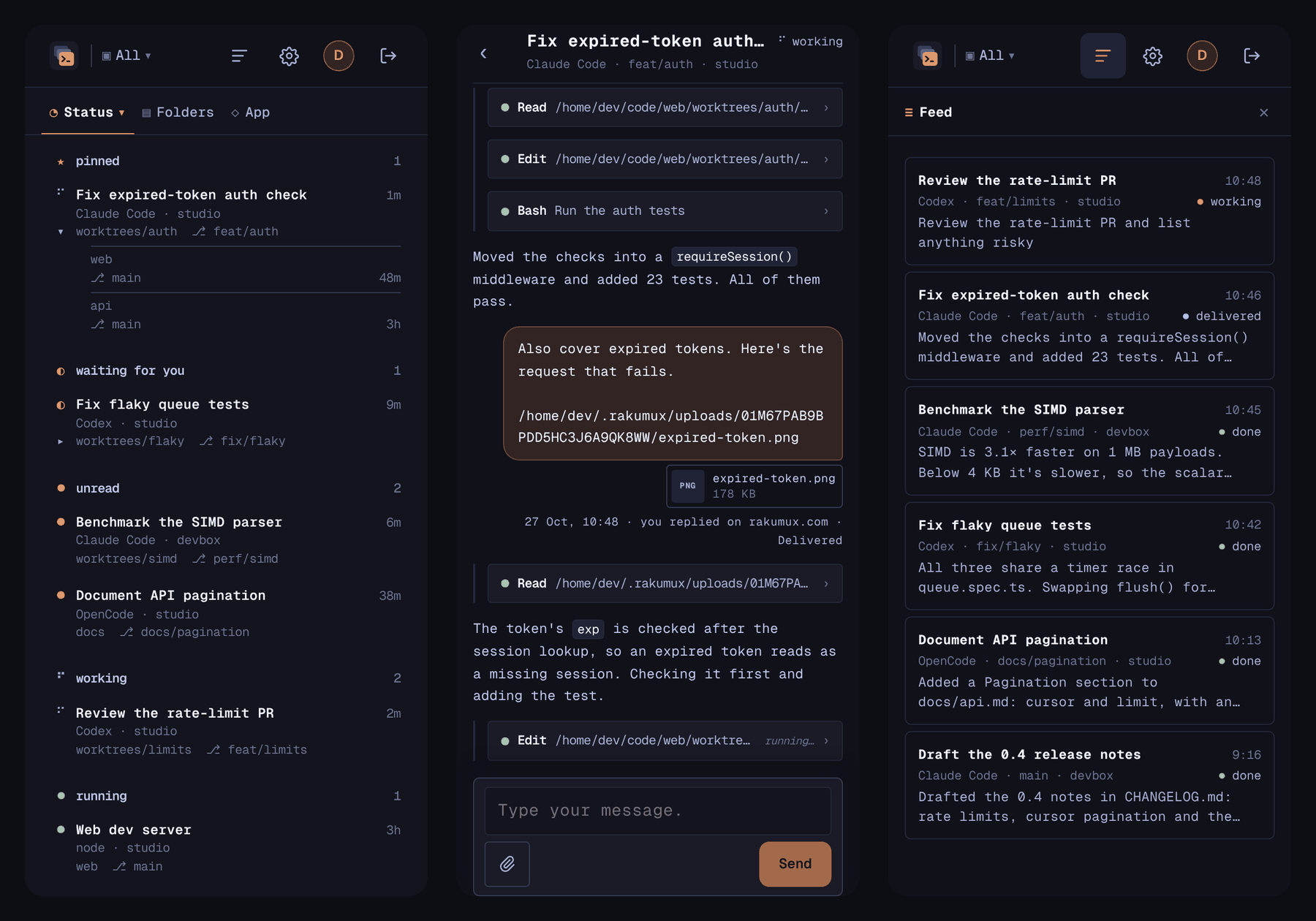
Signed in, the web app opens on Sessions (below). The Feed’s button (≡) at the top right of the header shows or hides your feed in a column on the right (on a phone, in place of the list); this browser remembers which, hidden at first. Where three columns don’t fit (narrower than 1100px), the feed takes the session list’s place while it shows. The rest of your account is under the Settings gear at the top right, and the Rakumux logo always takes you back to Sessions. While the feed is hidden, its button shows how many turns arrived since you last had it shown in this browser (●3; it checks once a minute while the tab is in view).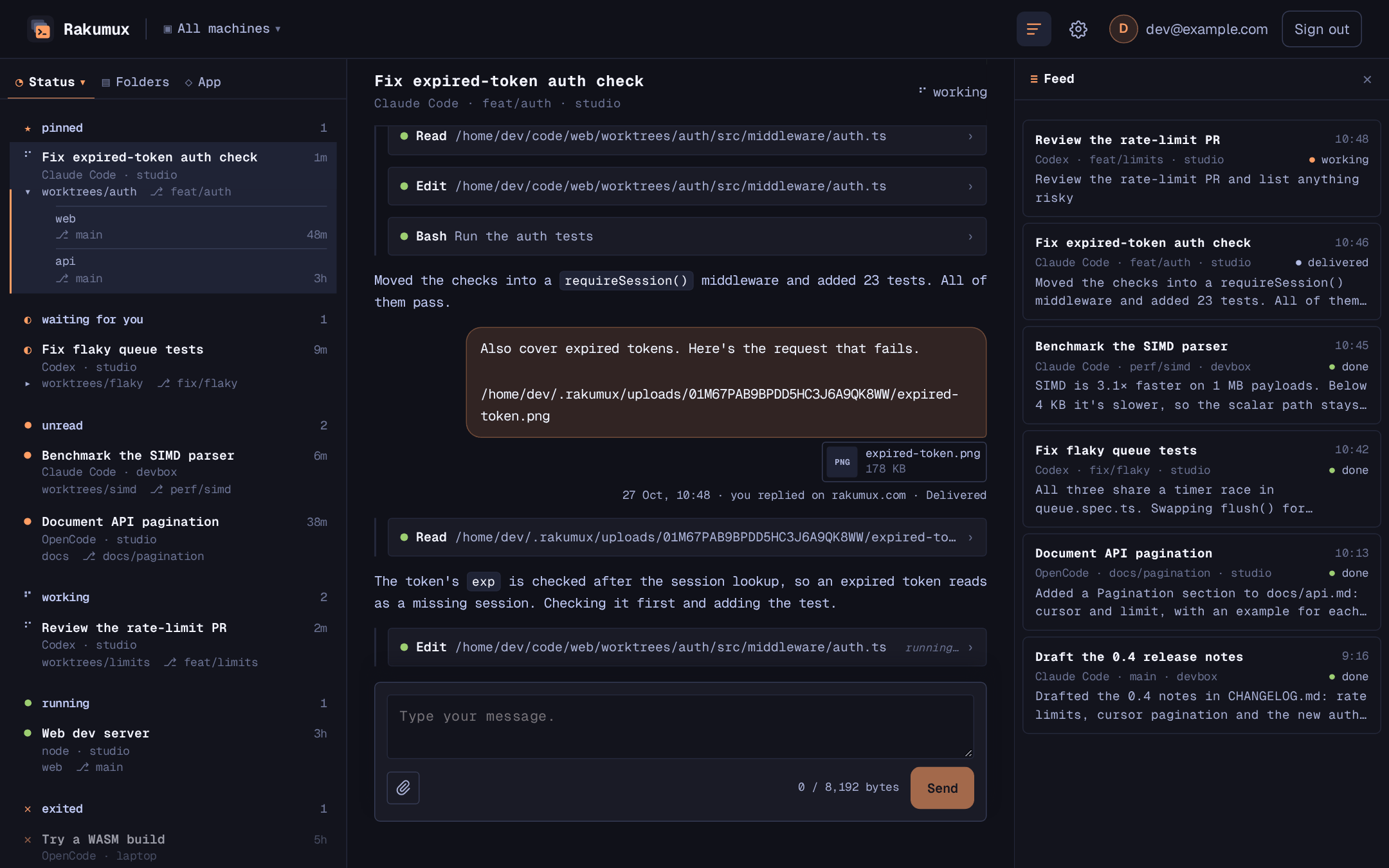
Rakumux’s Feed says the same in its own words: reply waiting, reply typed in, answered
and reply not sent, or only the mark where the card’s border is short of room.
New turns arrive at the top of the feed while it shows (it checks every 10 seconds while the tab is
in view, every 2 seconds while an agent’s working card is moving; a turn shows up about 15
seconds after it finishes, once its chat has arrived). If you’ve scrolled the feed down, it stays where
you are and a new button at its top takes you up to them.
Load older at the bottom of the feed goes back 20 turns at a time. Texts show whole, and a tool’s long input
or output scrolls inside its own box; a part over 16,384 characters, and a very long turn, are cut and
say so.
Your sessions on the web
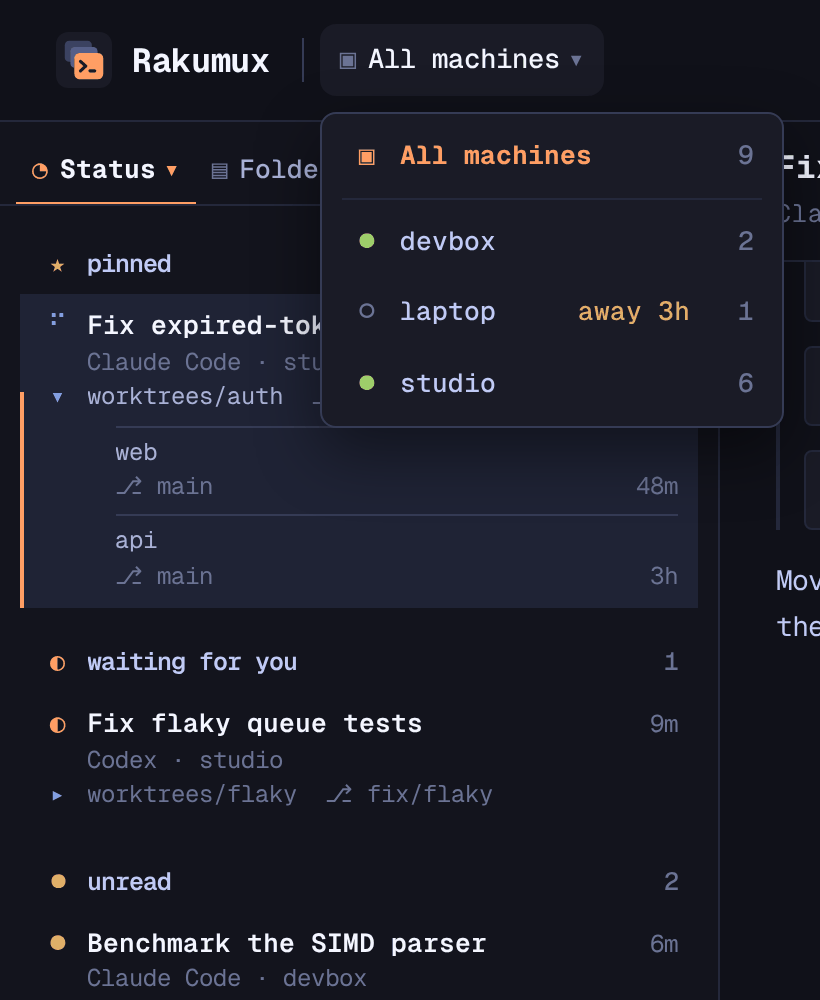
Each machine signed in also sends rakumux.com its list of sessions, so the web app’s Sessions shows them from every machine. The first row of its list groups them, as Rakumux’s tabs do: by Status (rakumux.com/status), Folders (rakumux.com/folders) or App (rakumux.com/app). The Rakumux logo takes you back to the grouping you last used, Status at first, with the session you had open. That takes Rakumux 0.1.20 or later; a machine sends its list when it changes and every minute.- Status groups the sessions as Rakumux’s Status tab does, in its order: waiting for you, unread, working, waiting for response, running, exited, then ready, each with its count and Rakumux’s mark, the most recently used first.
- Pinned sessions sit in their own section at the top of Status, Folders and App, above every status, folder and app, as in Rakumux’s list.
- Folders groups them by folder, as the Folders tab does, with the folder’s branch and how many of its sessions are running; with more than one machine, each machine’s folders sit under its name.
- App groups them by the app they run, as the App tab does: agents first, then other programs, then shell, each with how many of its sessions are running. Programs other than agents need Rakumux 0.1.21 or later; an older machine’s sessions without an agent are under shell.
Start a new session
Click New session in the header, on Status, Folders or App, or + New session at the foot of a folder under Folders. Choose the machine (it starts on the one the machine switcher shows, or the one you used last), the folder (the folders that machine lists; from a folder, that one), and what starts there: Shell, Claude Code, Codex, OpenCode, GitHub Copilot, Cursor, Pi, Grok, Kimi Code, Droid or Amp (only the agents that machine’s Rakumux can start: the last seven need the release that adds them), and, with an agent, a first prompt if you like (Enter starts, Shift+Enter starts a new line). Rakumux on that machine starts a login
shell in the folder with a generated name, and the agent in it, as rakumux new --cmd would; once
the session shows in the list, it opens. Your first prompt is typed in once the agent waits for you,
like a reply.
The website sends only the folder’s name and your choice, never a path or a command, and the machine
starts sessions only in folders it lists. A machine can start one while it’s online and runs Rakumux
0.1.33 or later, and so can your Sprite while it’s asleep: it shows asleep, will
wake, and rakumux.com wakes it. Other machines that are away show as away, and older ones with
Update Rakumux. When it can’t start one, it
says why: the machine no longer lists the folder, didn’t answer within 10 minutes, or couldn’t start
it.
Reply
You can write back to an agent from its turn in the feed: the box at the bottom of its session’s chat on rakumux.com, Reply under the turn when it opens on its own there (Enter sends,
Shift+Enter starts a new line, up to 8,192 bytes), or r on the turn in Rakumux’s Feed. Rakumux on the machine that ran the session
types your reply into it, as if you had typed it there, and the agent’s next reply answers it.
Under the turn you replied to, its thread shows each reply with where it’s up to; once the
agent answers, the reply and its answer become one card, the reply at its top. A reply to an answer
joins the same thread. A turn whose machine didn’t say which
of the agent’s chats it belongs to (older versions of Rakumux) has no Reply.
You can only reply to a session’s newest message: its latest turn, whether it shows on its own or as
an answer in a thread. Older turns of the same session have no Reply, and when a newer one arrives while you’re
writing, sending is turned off and the box says so, keeping your text so you can copy it to the newer
turn.
The machine types a reply in only when:
- the session is still running there, and isn’t private;
- it still shows the same chat (a session that moved on to another conversation doesn’t get it);
- the agent is waiting for you: it has finished its turn or is idle, never while it’s working or asking for permission, where your text could answer the agent’s question;
- nobody has typed in the session on that machine for 10 seconds, so your reply isn’t added to what someone is writing there (Rakumux 0.1.21 or later). Text left unsent in the agent’s prompt is still sent along with it.
Attach files
On rakumux.com you can attach files to a reply or to a message to a session: the paperclip beside Send, files dropped on the box, or files pasted into it (a screenshot, say; pasting text works as always, dictation apps included). Up to 5 files of at most 4 MB each, of any kind. Each one uploads as soon as you attach it, shown under the box with a thumbnail for pictures and its progress; Send goes at once, and the message waits for its files. A message with files and nothing written says “Here are the attached files.” Rakumux on the machine the message is for fetches the files before typing anything, saves them in~/.rakumux/uploads/ (in a folder for that message, kept 7 days) and types your message followed by
each file’s path, so the agent can open them. When a file can’t be fetched, nothing is typed and the
message says so. Attaching needs a Rakumux release that fetches files, on that machine: until it runs
there, the box says Update Rakumux on machine to send files.
rakumux.com keeps a file only until its machine has it: its contents are deleted as soon as the
message is typed in or fails, or after an hour if it never is, and a file you attach but don’t send
is deleted after an hour. Its name stays with your message, so the thread still shows what you sent.
Signed in, it’s on
The agent feed is part of every Rakumux account, Free or Pro; plans differ only in how long it’s kept (below). Every machine signed in to your account takes part. Signing out (rakumux account logout) empties the feed on that machine and stops it sending. Private sessions
never take part.
What’s sent, and where
Rakumux 0.1.17 sends only the finished Claude Code and Codex replies.